Claude Code for note-taking: lecture notes, flashcards and a dashboard
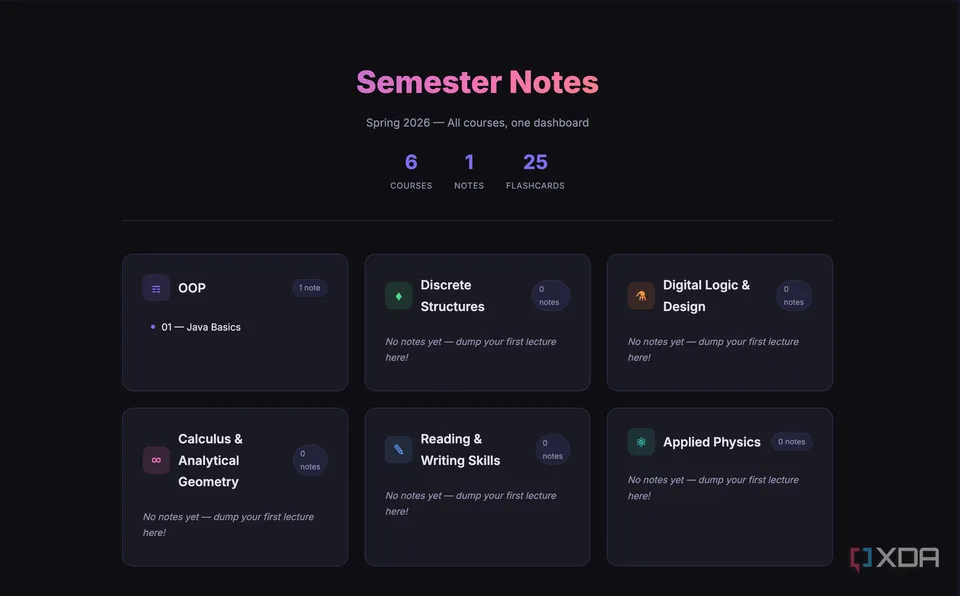
A student stopped organizing lecture notes in Notion. They dump rough notes into a folder where Claude Code follows a CLAUDE.md file, and it writes each note as an HTML page in their own style. Each page has a recap of earlier notes, a 'Beyond the Notes' section, flashcards and a quiz, and an index page lists every course.
Setup steps
- Create a folder for the term and open Claude Code in it
- List your courses and ask it to set up folders, an index page and a CLAUDE.md
- Give it an old note so it copies your formatting into CLAUDE.md
- After class, paste rough notes and name the course
- Open the HTML note: recap, extras, flashcards and quiz; check the extras
Steps summarized from the original Blog source ↗. Use “Copy” to grab them with the tools and source link, or copy an AI prompt.
How it went
The writer hadn't opened their Notion notes section in days and cancelled the subscription. Because CLAUDE.md is read every session, adding a rule improves every future note.
Worth knowing
Each note gets 3–5 extra points the writer didn't take down. Those are written by the AI, so check them against your course material.
Only what the original source ↗ says, re-read Oct 25, 2026. How we write these
Try it with AI
Paste this into ChatGPT, Claude or your own agent for step-by-step help. Prompt written by AppToBot from this recipe's data, not by the original author. It keeps drafts for your review and asks before anything is sent or paid.
Help me set up this automation using Claude Code + a CLAUDE.md file: "Claude Code for note-taking: lecture notes, flashcards and a dashboard".
Goal: replace Notion (note-taking).

How it should work:
- Trigger: You paste messy notes after a lecture
- Then: Claude Code files them by course using CLAUDE.md
- Then: Adds a recap and extra points
- Then: Builds flashcards and a quiz, updates the index
- Result: A formatted HTML study note

Setup steps (summarized from the original source):
1. Create a folder for the term and open Claude Code in it
2. List your courses and ask it to set up folders, an index page and a CLAUDE.md
3. Give it an old note so it copies your formatting into CLAUDE.md
4. After class, paste rough notes and name the course
5. Open the HTML note: recap, extras, flashcards and quiz; check the extras

Guide me one step at a time. Ask me for anything you need (accounts, sheet or channel names) before you start.

Safety rules:
- Build and test with sample data first, and show me a sample result before anything goes live.
- Keep anything that goes to other people (emails, posts, replies, record updates) as drafts for my review until I say otherwise.
- Never send, post, buy, pay, delete or change records without my approval.
- Tell me about any cost (paid plans, API usage) before I'd incur it, and help me set a spending limit.
- Keep API keys and passwords out of shared docs and chats.
- Privacy: Notes are local HTML files; what you paste is sent to Anthropic.

Based on: https://www.xda-developers.com/cancelled-my-notion-subscription-after-claude-code-learned-how-i-take-notes/
From the source
Tool names link to each official site (opens in a new tab).
Running cost: 💲 Paid plan needed Claude Code needs a paid Claude plan; the source doesn't state the plan or price. No-code How we sort costs
Stack: Claude
Replace an app: AI bots that replace Notion
App vs bot, side by side
| Old app / habit | Bot | |
|---|---|---|
| Tool | Notion | Claude Code in a notes folder, with rules in CLAUDE.md |
| Monthly cost | Notion subscription (amount not reported) | Claude plan (not reported) |
| Setup | None (already in use) | Not reported · Beginner |
| Your time | Baseline | Not reported |
| Maintenance | Handled by vendor/you as before | Edit CLAUDE.md when you want the format to change. |
| Privacy | Data stays with the app vendor | Notes are local HTML files; what you paste is sent to Anthropic. |
Full comparison
| Replaces | Notion |
|---|---|
| Bot / agent stack | Claude Code in a notes folder, with rules in CLAUDE.md |
| Monthly cost before | Notion subscription (amount not reported) |
| Monthly cost after | Claude plan (not reported) |
| Setup time | Not reported |
| Time saved | Not reported |
| Skill level | Beginner |
| Reliability | 3/5: firsthand and easy to copy, but only days of use. The AI adds its own extra facts to each note, so check them. |
| Maintenance | Edit CLAUDE.md when you want the format to change. |
| Privacy & data | Notes are local HTML files; what you paste is sent to Anthropic. |
| Best for | Students who abandon complex Notion setups |
| Not for | Teams who share and edit notes together |
Pros and cons
Pros
- No database or template decisions during class
- Flashcards and a quiz in every note
- The system improves as you edit one file
Cons
- The 'Beyond the Notes' extras are AI-written and can be wrong
- Terminal-based; HTML files rather than a synced app
Source and evidence
First-person XDA Developers article (May 2026): the writer hadn't opened their Notion notes in days and cancelled the subscription. No longer-term data.
Read the original Blog source ↗
“Not reported” means the source doesn't say. We never fill gaps with guesses. Numbers marked “per author” or “vendor claim” are the source's own and weren't independently tested. Source last checked Oct 25, 2026.
Our rating is an editorial opinion based on the public source above, not lab testing. Spot an error? Request a correction.
Plain-text summary (for search and AI assistants)
Claude Code for note-taking: lecture notes, flashcards and a dashboard. Replaces Notion with Claude Code in a notes folder, with rules in CLAUDE.md. Cost before: Notion subscription (amount not reported). Cost after: Claude plan (not reported). Setup: Not reported, Beginner. Time saved: Not reported. Reliability 3/5: 3/5: firsthand and easy to copy, but only days of use. The AI adds its own extra facts to each note, so check them. Best for: Students who abandon complex Notion setups. Not for: Teams who share and edit notes together. How it went (per source): The writer hadn't opened their Notion notes section in days and cancelled the subscription. Because CLAUDE.md is read every session, adding a rule improves every future note. Worth knowing: Each note gets 3–5 extra points the writer didn't take down. Those are written by the AI, so check them against your course material. Source: https://www.xda-developers.com/cancelled-my-notion-subscription-after-claude-code-learned-how-i-take-notes/
Related recipes
- Local Grammarly alternative: AI proofreading with an on-device model (4/5)
- Self-hosted Evernote alternative: Joplin plus an 'Ask My Notes' AI (4/5)
- Meeting recordings to Notion notes with n8n and AI (3/5)
- n8n morning briefing email: news, tasks and weather (3/5)
More: all Productivity recipes · AI bots that replace Notion
Questions, corrections or ideas?
Spotted an error, want a recipe covered, or have a partnership idea? Send us a message and we'll get back to you.
Starting your own newsletter? Try beehiiv ↗
What is beehiiv?
beehiiv is a newsletter platform: you write and send emails, host a newsletter website, and grow and monetize a list from one place. We've used it for our own newsletter.
beehiiv says (vendor claims, not tested by us):
- Free plan with up to 2,500 subscribers and unlimited sends
- Built-in website, recommendation network and analytics
- 0% cut of paid subscription revenue (Stripe fees apply)
Good for: starting or growing an email newsletter. Not ideal for: email automations or removing beehiiv branding on a $0 budget (those need Lite or Pro).
Free plan: $0, no card needed. Paid plans from $49/mo billed annually (Lite, up to 1,000 subscribers). People who sign up through our link get a 14-day trial plus 20% off their first 3 months, per beehiiv's partner page. Facts as of Oct 2026, from beehiiv's own website. More about beehiiv →