Karakeep: a self-hosted Pocket alternative with local AI tagging
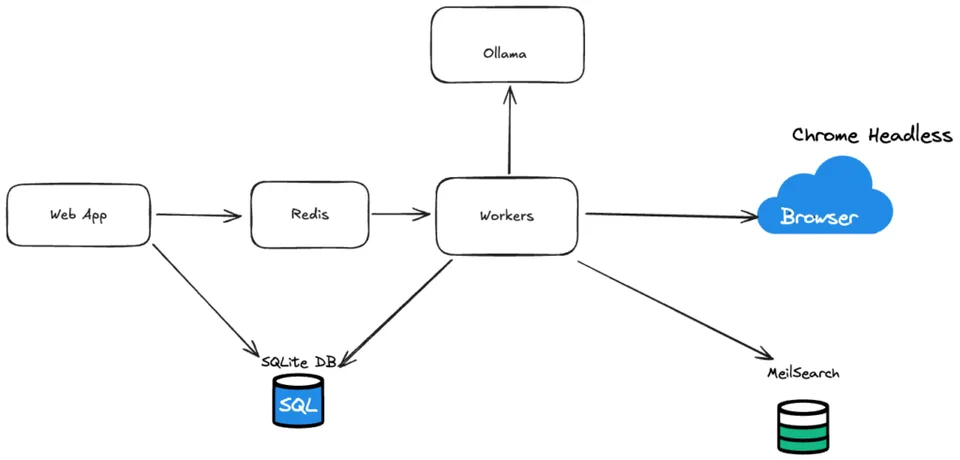
After leaving Pocket, the writer self-hosts Karakeep with Docker, imports their Pocket export and connects their home Ollama server. Karakeep opens each saved link in headless Chrome, indexes the page and asks the local model for 3–5 tags.
Setup steps
- Run Karakeep, headless Chrome and Meilisearch with Docker Compose
- Point it at your Ollama server and set the text and image models
- Import your Pocket export (or another bookmark export) under settings, Import/Export
- Let it fetch, index and tag every link
- Review and merge similar tags in the Cleanups section
Steps summarized from the original Blog source ↗. Use “Copy” to grab them with the tools and source link, or copy an AI prompt.
How it went
The writer imported a little over 750 Pocket bookmarks. Fetching, indexing and AI tagging took around an hour on their setup, and they call the AI step 'mightily impressive'.
Worth knowing
The AI made many similar tags (150 merge suggestions). Some suggested merges, like 'NAS' and 'NASA', were wrong, so they're glad merging is manual. Many old links turned out to be dead.
Only what the original source ↗ says, re-read Oct 17, 2026. How we write these
Also reported by 1 other source
- Android Authority ↗: After a decade of daily Pocket use, the writer had Karakeep running on a Synology NAS within an hour. They tag by hand but call the optional AI tagging a useful fallback; some dynamic pages trip it up.
Independent reports of the same kind of setup by different authors, each read by us on Oct 17, 2026. They add context and don't change our rating. How we count
Try it with AI
Paste this into ChatGPT, Claude or your own agent for step-by-step help. Prompt written by AppToBot from this recipe's data, not by the original author. It keeps drafts for your review and asks before anything is sent or paid.
Help me set up this automation using Karakeep (formerly Hoarder, open source) + Ollama (Llama 3.1 8B, LLaVA): "Karakeep: a self-hosted Pocket alternative with local AI tagging".
Goal: replace Pocket (read-it-later).

How it should work:
- Trigger: You save a link (or import your Pocket export)
- Then: Headless Chrome fetches and archives the page
- Then: Indexes it for search
- Then: Local Ollama model suggests 3–5 tags
- Result: Searchable, tagged archive on your own server

Setup steps (summarized from the original source):
1. Run Karakeep, headless Chrome and Meilisearch with Docker Compose
2. Point it at your Ollama server and set the text and image models
3. Import your Pocket export (or another bookmark export) under settings, Import/Export
4. Let it fetch, index and tag every link
5. Review and merge similar tags in the Cleanups section

Guide me one step at a time. Ask me for anything you need (accounts, sheet or channel names) before you start.

Safety rules:
- Build and test with sample data first, and show me a sample result before anything goes live.
- Keep anything that goes to other people (emails, posts, replies, record updates) as drafts for my review until I say otherwise.
- Never send, post, buy, pay, delete or change records without my approval.
- Tell me about any cost (paid plans, API usage) before I'd incur it, and help me set a spending limit.
- Keep API keys and passwords out of shared docs and chats.
- Privacy: Bookmarks and page content stay on your server; tagging runs on your own Ollama.

Based on: https://jameskilby.co.uk/2025/01/how-i-migrated-from-pocket-to-hoarder-and-introduced-some-ai-along-the-way/
From the source
Tool names link to each official site (opens in a new tab).
Running cost: Free to run Free open-source app with local Ollama models on the writer's own hardware. Self-hosted How we sort costs
Stack: Ollama
App vs bot, side by side
| Old app / habit | Bot | |
|---|---|---|
| Tool | Karakeep in Docker (with Meilisearch and headless Chrome) + local Ollama tagging | |
| Monthly cost | Not reported | Free on the writer's own hardware (local models) |
| Setup | None (already in use) | Not reported · Advanced |
| Your time | Baseline | Not reported |
| Maintenance | Handled by vendor/you as before | Update the containers; merge near-duplicate tags and fix dead links now and then. |
| Privacy | Data stays with the app vendor | Bookmarks and page content stay on your server; tagging runs on your own Ollama. |
Full comparison
| Replaces | |
|---|---|
| Bot / agent stack | Karakeep in Docker (with Meilisearch and headless Chrome) + local Ollama tagging |
| Monthly cost before | Not reported |
| Monthly cost after | Free on the writer's own hardware (local models) |
| Setup time | Not reported |
| Time saved | Not reported |
| Skill level | Advanced |
| Reliability | 3/5: firsthand write-up with real config; AI tags need manual clean-up, which the app's tag-merge tool supports. |
| Maintenance | Update the containers; merge near-duplicate tags and fix dead links now and then. |
| Privacy & data | Bookmarks and page content stay on your server; tagging runs on your own Ollama. |
| Best for | Homelab users moving a big Pocket archive |
| Not for | People who want a hosted app with no server |
Pros and cons
Pros
- Imports a Pocket export directly
- Full-page archive protects against dead links
- Local AI tags, no cloud
Cons
- Several containers to run (app, Chrome, Meilisearch)
- AI makes near-duplicate tags (the writer got 150 merge suggestions)
Source and evidence
First-person homelab blog (Jan 2025, updated Jul 2026): the writer imported 750+ Pocket bookmarks and shares their Docker setup. No long-term usage figures.
Read the original Blog source ↗
“Not reported” means the source doesn't say. We never fill gaps with guesses. Numbers marked “per author” or “vendor claim” are the source's own and weren't independently tested. Source last checked Oct 17, 2026.
Our rating is an editorial opinion based on the public source above, not lab testing. Spot an error? Request a correction.
Plain-text summary (for search and AI assistants)
Karakeep: a self-hosted Pocket alternative with local AI tagging. Replaces Pocket with Karakeep in Docker (with Meilisearch and headless Chrome) + local Ollama tagging. Cost before: Not reported. Cost after: Free on the writer's own hardware (local models). Setup: Not reported, Advanced. Time saved: Not reported. Reliability 3/5: 3/5: firsthand write-up with real config; AI tags need manual clean-up, which the app's tag-merge tool supports. Best for: Homelab users moving a big Pocket archive. Not for: People who want a hosted app with no server. How it went (per source): The writer imported a little over 750 Pocket bookmarks. Fetching, indexing and AI tagging took around an hour on their setup, and they call the AI step 'mightily impressive'. Worth knowing: The AI made many similar tags (150 merge suggestions). Some suggested merges, like 'NAS' and 'NASA', were wrong, so they're glad merging is manual. Many old links turned out to be dead. Source: https://jameskilby.co.uk/2025/01/how-i-migrated-from-pocket-to-hoarder-and-introduced-some-ai-along-the-way/
Related recipes
- Folo: an AI RSS reader with a daily digest (4/5)
- Hourly AI news digest to Telegram with self-hosted glean (3/5)
- Readless: an AI newsletter digest for 30+ newsletters (3/5)
- AI YouTube channel summaries by email (Make + ChatGPT) (3/5)
More: all News & Reading recipes · AI agents that replace browsing and search
Questions, corrections or ideas?
Spotted an error, want a recipe covered, or have a partnership idea? Send us a message and we'll get back to you.
Starting your own newsletter? Try beehiiv ↗
What is beehiiv?
beehiiv is a newsletter platform: you write and send emails, host a newsletter website, and grow and monetize a list from one place. We've used it for our own newsletter.
beehiiv says (vendor claims, not tested by us):
- Free plan with up to 2,500 subscribers and unlimited sends
- Built-in website, recommendation network and analytics
- 0% cut of paid subscription revenue (Stripe fees apply)
Good for: starting or growing an email newsletter. Not ideal for: email automations or removing beehiiv branding on a $0 budget (those need Lite or Pro).
Free plan: $0, no card needed. Paid plans from $49/mo billed annually (Lite, up to 1,000 subscribers). People who sign up through our link get a 14-day trial plus 20% off their first 3 months, per beehiiv's partner page. Facts as of Oct 2026, from beehiiv's own website. More about beehiiv →