n8n invoice OCR from Drive, Gmail and Telegram to Sheets
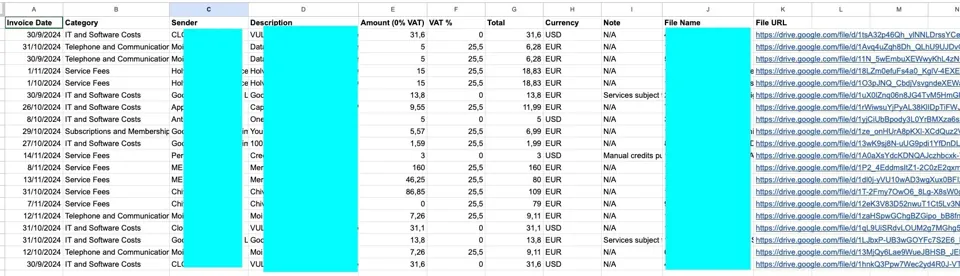
Watches a Drive folder, a Gmail label, and a Telegram bot for invoices, OCRs them with Gemini, and writes structured fields to Sheets.
Setup steps
- Import template
- Add Gemini key
- Set Drive folder, Gmail label, Telegram bot
- Connect Sheets
Steps summarized from the original Template source ↗. Use “Copy” to grab them with the tools and source link, or copy an AI prompt.
Try it with AI
Paste this into ChatGPT, Claude or your own agent for step-by-step help. Prompt written by AppToBot from this recipe's data, not by the original author. It keeps drafts for your review and asks before anything is sent or paid.
Help me set up this automation using n8n + Gemini API + Google Sheets: "n8n invoice OCR from Drive, Gmail and Telegram to Sheets".
Goal: replace Bookkeeping data entry.

How it should work:
- Trigger: Invoice in Drive, Gmail or Telegram
- Then: Gemini OCRs it
- Then: Pulls out structured fields
- Result: Fields written to Sheets

Setup steps (summarized from the original source):
1. Import template
2. Add Gemini key
3. Set Drive folder, Gmail label, Telegram bot
4. Connect Sheets

Guide me one step at a time. Ask me for anything you need (accounts, sheet or channel names) before you start.

Safety rules:
- Build and test with sample data first, and show me a sample result before anything goes live.
- Keep anything that goes to other people (emails, posts, replies, record updates) as drafts for my review until I say otherwise.
- Never send, post, buy, pay, delete or change records without my approval.
- Tell me about any cost (paid plans, API usage) before I'd incur it, and help me set a spending limit.
- Keep API keys and passwords out of shared docs and chats.
- Privacy: Invoices go to Google Gemini.

Based on: https://n8n.io/workflows/3618-auto-invoice-and-receipt-ocr-to-google-sheets-drive-gmail-and-telegram-triggers/
From the source
Tool names link to each official site (opens in a new tab).
Running cost: API pennies Gemini API key; the template is a one-time $5 purchase. No-code How we sort costs
Stack: n8n · Gemini · Google Sheets
App vs bot, side by side
| Old app / habit | Bot | |
|---|---|---|
| Tool | Bookkeeping data entry | n8n + Gemini + Drive/Gmail/Telegram triggers + Sheets |
| Monthly cost | Not reported | $5 template (n8n listing) + Gemini key + n8n |
| Setup | None (already in use) | Not reported · Intermediate |
| Your time | Baseline | Not reported |
| Maintenance | Handled by vendor/you as before | Check extracted fields periodically. |
| Privacy | Data stays with the app vendor | Invoices go to Google Gemini. |
Full comparison
| Replaces | Bookkeeping data entry |
|---|---|
| Bot / agent stack | n8n + Gemini + Drive/Gmail/Telegram triggers + Sheets |
| Monthly cost before | Not reported |
| Monthly cost after | $5 template (n8n listing) + Gemini key + n8n |
| Setup time | Not reported |
| Time saved | Not reported |
| Skill level | Intermediate |
| Reliability | 3/5: published template. |
| Maintenance | Check extracted fields periodically. |
| Privacy & data | Invoices go to Google Gemini. |
| Best for | Freelancers and bookkeepers |
| Not for | Firms needing audit-grade accounting |
Pros and cons
Pros
- Three ways to submit invoices
Cons
- Paid template
- OCR errors need checking
Source and evidence
Published template.
Read the original Template source ↗
“Not reported” means the source doesn't say. We never fill gaps with guesses. Numbers marked “per author” or “vendor claim” are the source's own and weren't independently tested. Source last checked Oct 15, 2026.
Our rating is an editorial opinion based on the public source above, not lab testing. Spot an error? Request a correction.
Plain-text summary (for search and AI assistants)
n8n invoice OCR from Drive, Gmail and Telegram to Sheets. Replaces Bookkeeping data entry with n8n + Gemini + Drive/Gmail/Telegram triggers + Sheets. Cost before: Not reported. Cost after: $5 template (n8n listing) + Gemini key + n8n. Setup: Not reported, Intermediate. Time saved: Not reported. Reliability 3/5: 3/5: published template. Best for: Freelancers and bookkeepers. Not for: Firms needing audit-grade accounting. Source: https://n8n.io/workflows/3618-auto-invoice-and-receipt-ocr-to-google-sheets-drive-gmail-and-telegram-triggers/
Related recipes
- Telegram expense tracker bot with Gemini receipt reading (3/5)
- Free n8n receipt OCR: Telegram photo to Google Sheets (3/5)
- Itemized receipt scanner to Google Sheets you can ask questions (3/5)
- Use Claude to categorize bank transactions in Google Sheets (3/5)
More: all Finance recipes · Best AI agents to replace Zapier · n8n vs Make: AI agent recipes compared
Questions, corrections or ideas?
Spotted an error, want a recipe covered, or have a partnership idea? Send us a message and we'll get back to you.
Starting your own newsletter? Try beehiiv ↗
What is beehiiv?
beehiiv is a newsletter platform: you write and send emails, host a newsletter website, and grow and monetize a list from one place. We've used it for our own newsletter.
beehiiv says (vendor claims, not tested by us):
- Free plan with up to 2,500 subscribers and unlimited sends
- Built-in website, recommendation network and analytics
- 0% cut of paid subscription revenue (Stripe fees apply)
Good for: starting or growing an email newsletter. Not ideal for: email automations or removing beehiiv branding on a $0 budget (those need Lite or Pro).
Free plan: $0, no card needed. Paid plans from $49/mo billed annually (Lite, up to 1,000 subscribers). People who sign up through our link get a 14-day trial plus 20% off their first 3 months, per beehiiv's partner page. Facts as of Oct 2026, from beehiiv's own website. More about beehiiv →